
As you know Magento 2 GA is already released on mid of November 2015. Now the development of Magento 2 components is taking by storm and the developers are especially busy with porting their popular Magento 1 extensions.
In our case, We are already into Magento 2 development: busy porting some of our popular Magento 1 Extensions and side by side learning new concepts introduced by Magento 2.
In this tutorial, we will learn how to create a custom shipping module in Magento2 which is fairly easy as compared to CRUD & Payment modules.
Assumptions:
- Namespace: MagePsycho
- Module: Customshipping
Custom Shipping Module Development
1. Register the module
File: app/code/MagePsycho/Customshipping/etc/module.xml
<?xml version="1.0"?>
<!--
/**
 * @category   MagePsycho
 * @package    MagePsycho_Customshipping
 * @author     [email protected]
 * @website    https://www.magepsycho.com
 * @license    http://opensource.org/licenses/osl-3.0.php  Open Software License (OSL 3.0)
 */
-->
<config xmlns:xsi="http://www.w3.org/2001/XMLSchema-instance" xsi:noNamespaceSchemaLocation="../../../../../lib/internal/Magento/Framework/Module/etc/module.xsd">
    <module name="MagePsycho_Customshipping" setup_version="1.0.0">
    </module>
</config>
2. Add System Configuration Settings
File: app/code/MagePsycho/Customshipping/etc/adminhtml/system.xml
<?xml version="1.0"?>
<!--
/**
 * @category   MagePsycho
 * @package    MagePsycho_Customshipping
 * @author     [email protected]
 * @website    https://www.magepsycho.com
 * @license    http://opensource.org/licenses/osl-3.0.php  Open Software License (OSL 3.0)
 */
-->
<config xmlns:xsi="http://www.w3.org/2001/XMLSchema-instance" xsi:noNamespaceSchemaLocation="../../../../Magento/Config/etc/system_file.xsd">
    <system>
        <section id="carriers" translate="label" type="text" sortOrder="1" showInDefault="1" showInWebsite="1" showInStore="1">
            <group id="magepsycho_customshipping" translate="label" type="text" sortOrder="2" showInDefault="1" showInWebsite="1" showInStore="1">
                <label>Custom Shipping</label>
                <field id="active" translate="label" type="select" sortOrder="1" showInDefault="1" showInWebsite="1" showInStore="0">
                    <label>Enabled</label>
                    <source_model>Magento\Config\Model\Config\Source\Yesno</source_model>
                </field>
                <field id="title" translate="label" type="text" sortOrder="2" showInDefault="1" showInWebsite="1" showInStore="1">
                    <label>Title</label>
                </field>
                <field id="name" translate="label" type="text" sortOrder="3" showInDefault="1" showInWebsite="1" showInStore="1">
                    <label>Method Name</label>
                </field>
                <field id="price" translate="label" type="text" sortOrder="4" showInDefault="1" showInWebsite="1" showInStore="0">
                    <label>Shipping Cost</label>
                    <validate>validate-number validate-zero-or-greater</validate>
                </field>
                <field id="specificerrmsg" translate="label" type="textarea" sortOrder="80" showInDefault="1" showInWebsite="1" showInStore="1">
                    <label>Displayed Error Message</label>
                </field>
                <field id="sallowspecific" translate="label" type="select" sortOrder="90" showInDefault="1" showInWebsite="1" showInStore="0">
                    <label>Ship to Applicable Countries</label>
                    <frontend_class>shipping-applicable-country</frontend_class>
                    <source_model>Magento\Shipping\Model\Config\Source\Allspecificcountries</source_model>
                </field>
                <field id="specificcountry" translate="label" type="multiselect" sortOrder="91" showInDefault="1" showInWebsite="1" showInStore="0">
                    <label>Ship to Specific Countries</label>
                    <source_model>Magento\Directory\Model\Config\Source\Country</source_model>
                    <can_be_empty>1</can_be_empty>
                </field>
                <field id="showmethod" translate="label" type="select" sortOrder="92" showInDefault="1" showInWebsite="1" showInStore="0">
                    <label>Show Method if Not Applicable</label>
                    <source_model>Magento\Config\Model\Config\Source\Yesno</source_model>
                </field>
                <field id="sort_order" translate="label" type="text" sortOrder="100" showInDefault="1" showInWebsite="1" showInStore="0">
                    <label>Sort Order</label>
                </field>
            </group>
        </section>
    </system>
</config>
3. Define shipping carrier model
File: app/code/MagePsycho/Customshipping/etc/config.xml
<?xml version="1.0"?>
<!--
/**
 * @category   MagePsycho
 * @package    MagePsycho_Customshipping
 * @author     [email protected]
 * @website    https://www.magepsycho.com
 * @license    http://opensource.org/licenses/osl-3.0.php  Open Software License (OSL 3.0)
 */
-->
<config xmlns:xsi="http://www.w3.org/2001/XMLSchema-instance" xsi:noNamespaceSchemaLocation="../../../Magento/Store/etc/config.xsd">
    <default>
        <carriers>
            <magepsycho_customshipping>
                <active>0</active>
                <sallowspecific>0</sallowspecific>
                <price>0</price>
                <model>MagePsycho\Customshipping\Model\Carrier\Customshipping</model>
                <name>Fixed</name>
                <title>Custom Shipping</title>
                <specificerrmsg>This shipping method is not available. To use this shipping method, please contact us.</specificerrmsg>
            </magepsycho_customshipping>
        </carriers>
    </default>
</config>
Notes: ‘config/default/carriers/model’ node is used to define a Model class for Custom Shipping which will be responsible for handling the Shipping Charges.
In fact, this file is also used to set default values for Shipping Settings.
4. Create shipping carrier model class
File: app/code/MagePsycho/Customshipping/Model/Carrier/Customshipping.php
<?php

namespace MagePsycho\Customshipping\Model\Carrier;

use Magento\Quote\Model\Quote\Address\RateRequest;

/**
 * @category   MagePsycho
 * @package    MagePsycho_Customshipping
 * @author     [email protected]
 * @website    https://www.magepsycho.com
 * @license    http://opensource.org/licenses/osl-3.0.php  Open Software License (OSL 3.0)
 */
class Customshipping extends \Magento\Shipping\Model\Carrier\AbstractCarrier implements
	\Magento\Shipping\Model\Carrier\CarrierInterface
{
	/**
	 * @var string
	 */
	protected $_code = 'magepsycho_customshipping';

	/**
	 * @var bool
	 */
	protected $_isFixed = true;

	/**
	 * @var \Magento\Shipping\Model\Rate\ResultFactory
	 */
	protected $_rateResultFactory;

	/**
	 * @var \Magento\Quote\Model\Quote\Address\RateResult\MethodFactory
	 */
	protected $_rateMethodFactory;

	/**
	 * @param \Magento\Framework\App\Config\ScopeConfigInterface $scopeConfig
	 * @param \Magento\Quote\Model\Quote\Address\RateResult\ErrorFactory $rateErrorFactory
	 * @param \Psr\Log\LoggerInterface $logger
	 * @param \Magento\Shipping\Model\Rate\ResultFactory $rateResultFactory
	 * @param \Magento\Quote\Model\Quote\Address\RateResult\MethodFactory $rateMethodFactory
	 * @param array $data
	 */
	public function __construct(
		\Magento\Framework\App\Config\ScopeConfigInterface $scopeConfig,
		\Magento\Quote\Model\Quote\Address\RateResult\ErrorFactory $rateErrorFactory,
		\Psr\Log\LoggerInterface $logger,
		\Magento\Shipping\Model\Rate\ResultFactory $rateResultFactory,
		\Magento\Quote\Model\Quote\Address\RateResult\MethodFactory $rateMethodFactory,
		array $data = []
	) {
		$this->_rateResultFactory = $rateResultFactory;
		$this->_rateMethodFactory = $rateMethodFactory;
		parent::__construct($scopeConfig, $rateErrorFactory, $logger, $data);
	}

	/**
	 * @param RateRequest $request
	 * @return \Magento\Shipping\Model\Rate\Result
	 * @SuppressWarnings(PHPMD.UnusedLocalVariable)
	 */
	public function collectRates(RateRequest $request)
	{
		if (!$this->getConfigFlag('active')) {
			return false;
		}

		/** @var \Magento\Shipping\Model\Rate\Result $result */
		$result = $this->_rateResultFactory->create();

		$shippingPrice = $this->getConfigData('price');

		$method = $this->_rateMethodFactory->create();

		$method->setCarrier($this->_code);
		$method->setCarrierTitle($this->getConfigData('title'));

		$method->setMethod($this->_code);
		$method->setMethodTitle($this->getConfigData('name'));

		$method->setPrice($shippingPrice);
		$method->setCost($shippingPrice);

		$result->append($method);

		return $result;
	}

	/**
	 * Get allowed shipping methods
	 *
	 * @return array
	 */
	public function getAllowedMethods()
	{
		return [$this->_code => $this->getConfigData('name')];
	}
}
That’s all from the development point of view.
Now you need to enable the module by running following series of commands(from the root of your Magento 2 installation):
php bin/magento module:enable MagePsycho_Customshipping --clear-static-content
php bin/magento setup:upgrade
Go to the backend: System > Configuration > Sales > Shipping Methods > You will see a new tab named ‘Custom Shipping’. And the settings looks like:

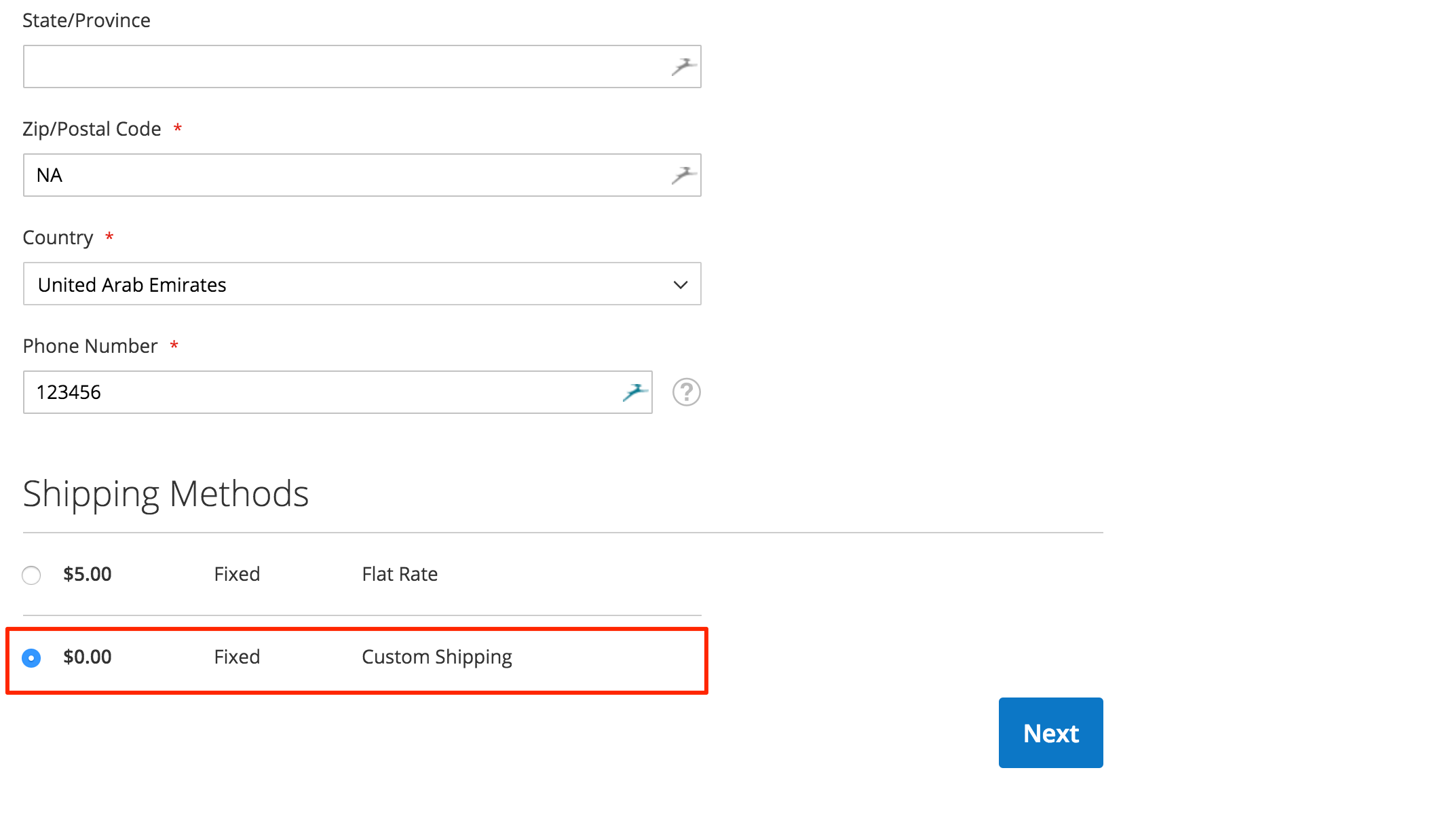
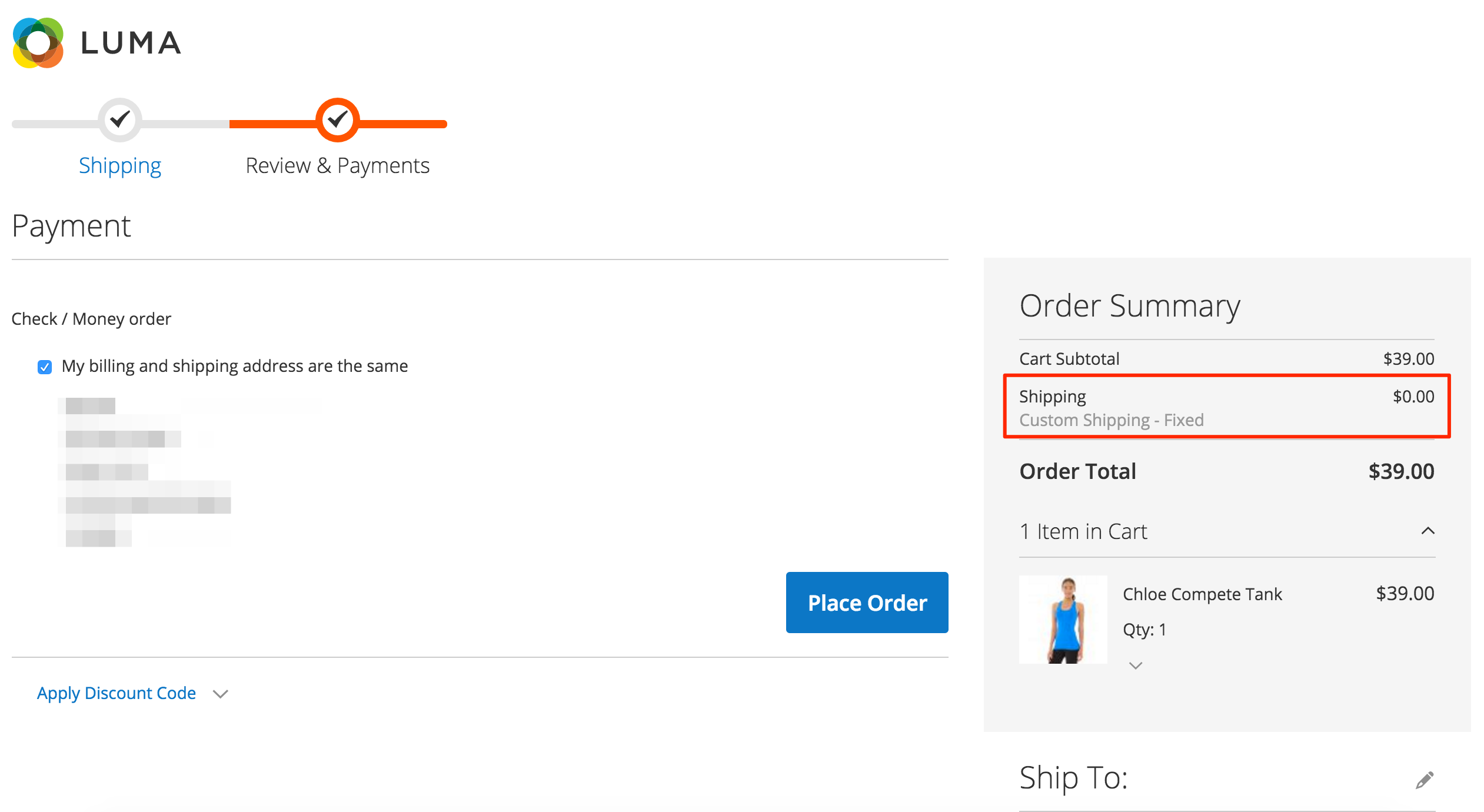
And the frontend looks like:
This module is available on GitHub.
In order to install the module from GitHub:
Installation Using Composer
composer config repositories.magesycho-magento2-custom-shipping git [email protected]:MagePsycho/magento2-custom-shipping.git
composer require magepsycho/magento2-custom-shipping:dev-master
Installation Using Zip
Download the zip file, extract & upload the files to path: app/code/MagePsycho/Customshipping/
After installation, don’t forget to enable the Module as described above.
NOTE: Magento 2 Custom Shipping module is also available in MagePsycho Store
Please do comment below if you have any queries regarding Shipping Module development in Magento 2.
Thanks a lot for your extension. It works well in my new system. One question I have is that if it’s possible just to expose the custom shipping to Admin interface only when making order, not front-end customer interfce?
Yeah you can tweak it easily. Just check the area code in beginning of MagePsychoCustomshippingModelCarrierCustomshipping::collectRates() method.
It gives error in payment page “Please specify a shipping method”
I am also facing the same error on payment page.
Please fix the issue asap.
Anyone have solution please provide me asap
Please find the latest version of this extension from our store – https://www.magepsycho.com/magento-2-custom-shipping.html
Please use the latest version of this extension from our store – https://www.magepsycho.com/magento-2-custom-shipping.html
To big to my brain. Where are You, old good magento 1… http://www.angry.blue
Good module but not working magento shipping rules.
Thanks for raising the issue. Will check and get back to you. Better I would recommend to raise issues in github: https://github.com/MagePsycho/magento2-custom-shipping/issues
thank for the sharing!
I also recommend an extension from BSSCommerce: https://bsscommerce.com/magento2-shipping-and-payment-method-per-customer-group.html
With this extension, admin can easily customize not only shipping but also payment method for each customer group.
Great article! One thing, you forgot the registration.php in the root folder of the module. You won’t be able to run module:enable command without it 🙂
<?php

/**

 * Copyright © 2016  MagePsycho. All rights reserved.

 * See COPYING.txt for license details.

 */
MagentoFrameworkComponentComponentRegistrar::register(
MagentoFrameworkComponentComponentRegistrar::MODULE,
' MagePsycho_Customshipping',
__DIR__
);
You need to add validation rules, see http://devdocs.magento.com/guides/v2.0/howdoi/checkout/checkout_carrier.html
Is it possible for this to work with a table rate shipping rather than fixed rate? Ideally I want to use it as a second table rate shipping for express delivery as magento 2 wont allow a second method under basic table rate
May be you have to duplicate the default table rate with new shipping code + table.
How can i get this to work with 3rd party API?
Just consume the WebService to get the shipping fee in MagePsychoCustomshippingModelCarrierCustomshipping::collectRates() method.