
Introduction
Just keep reading this tutorial which will teach how to create a fancy FAQ with an expandable/collapsible feature in an easier approach.
In short, creating a fancy FAQ section can be easily achieved in Magento by using CMS page & jQuery.
Steps
Go to Admin > CMS Pages > Add New Page and implement the following steps:
1. Add FAQ contents
Add the following content in the ‘Content’ > ‘Content’ section of CMS page:
<div class="expand_wrapper">
	<h2 class="expand_heading"><a href="#">1. WordPress Theme Development</a></h2>
	<div class="toggle_container">
		<div class="box">
			<p>Lorem ipsum dolor sit amet, consectetur adipisicing elit, sed do eiusmod tempor incididunt ut labore et dolore magna aliqua. Ut enim ad minim veniam, quis nostrud exercitation ullamco laboris nisi ut aliquip ex ea commodo consequat. Duis aute irure dolor in reprehenderit in voluptate velit esse cillum dolore eu fugiat nulla pariatur. Excepteur sint occaecat cupidatat non proident, sunt in culpa qui officia deserunt mollit anim id est laborum</p>
		</div>
	</div>
	<h2 class="expand_heading"><a href="#">2. Magento E-commerce</a></h2>
	<div class="toggle_container">
		<div class="box">
			<p>Lorem ipsum dolor sit amet, consectetur adipisicing elit, sed do eiusmod tempor incididunt ut labore et dolore magna aliqua. Ut enim ad minim veniam, quis nostrud exercitation ullamco laboris nisi ut aliquip ex ea commodo consequat. Duis aute irure dolor in reprehenderit in voluptate velit esse cillum dolore eu fugiat nulla pariatur. Excepteur sint occaecat cupidatat non proident, sunt in culpa qui officia deserunt mollit anim id est laborum</p>
			<p>Excepteur sint occaecat cupidatat non proident, sunt in culpa qui officia deserunt mollit anim id est laborum</p>
		</div>
	</div>
	<h2 class="expand_heading"><a href="#">3. Website Development</a></h2>
	<div class="toggle_container">
		<div class="box">
			<p>Lorem ipsum dolor sit amet, consectetur adipisicing elit, sed do eiusmod tempor incididunt ut labore et dolore magna aliqua. Ut enim ad minim veniam, quis nostrud exercitation ullamco laboris nisi ut aliquip ex ea commodo consequat. Duis aute irure dolor in reprehenderit in voluptate velit esse cillum dolore eu fugiat nulla pariatur. Excepteur sint occaecat cupidatat non proident, sunt in culpa qui officia deserunt mollit anim id est laborum</p>
			<p>Excepteur sint occaecat cupidatat non proident, sunt in culpa qui officia deserunt mollit anim id est laborum</p>
		</div>
	</div>
	<h2 class="expand_heading"><a href="#">4. PHP MySql Development</a></h2>
	<div class="toggle_container">
		<div class="box">
			<p>Lorem ipsum dolor sit amet, consectetur adipisicing elit, sed do eiusmod tempor incididunt ut labore et dolore magna aliqua. Ut enim ad minim veniam, quis nostrud exercitation ullamco laboris nisi ut aliquip ex ea commodo consequat. Duis aute irure dolor in reprehenderit in voluptate velit esse cillum dolore eu fugiat nulla pariatur. Excepteur sint occaecat cupidatat non proident, sunt in culpa qui officia deserunt mollit anim id est laborum</p>
			<p>Excepteur sint occaecat cupidatat non proident, sunt in culpa qui officia deserunt mollit anim id est laborum</p>
		</div>
	</div>
</div>
2. Inject jQuery code
Add the following XML code in ‘Design’ > ‘Layout Update XML’ field of CMS page:
<reference name="head">
	<block type="core/text" name="google.cdn.jquery">
		<action method="setText">
			<text><![CDATA[
<script type="text/javascript" src="https://ajax.googleapis.com/ajax/libs/jquery/1/jquery.min.js"></script>
<script type="text/javascript">jQuery.noConflict();</script>
<script type="text/javascript">
	jQuery(document).ready(function(){
		jQuery(".toggle_container").slice(1).hide();//expands first FAQ content
		jQuery(".expand_heading:first").addClass("active");//add active class to first FAQ title
		jQuery("h2.expand_heading").click(function(event){
			event.preventDefault()
			jQuery(this).toggleClass("active");
			jQuery(this).next(".toggle_container").slideToggle("slow");
		});
	});
</script>

			]]></text>
		</action>
	</block>
</reference>
3. You’re done
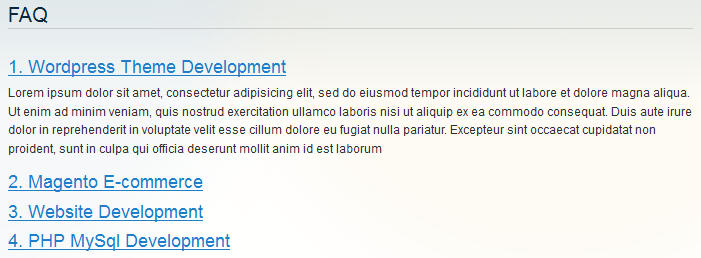
Go to the frontend and open the FAQ page, you will see as:
Happy E-Commerce!