
Introduction
While creating a configurable product, you need to create an attribute(s) which will be used as a select option(s) for the customer(For Example Color, Size, etc.). These kinda attributes are called super attributes or configurable attributes.
In this article, we will be discussing how to get different info about super attributes using raw SQL.
1. Getting Super Attribute Info
SELECT
attribute_id,
attribute_code,
frontend_label
FROM
eav_attribute
WHERE attribute_id IN
(SELECT
attribute_id
FROM
catalog_product_super_attribute
WHERE product_id = $productId)
2. Getting Super Attribute Labels
SELECT
value
FROM
catalog_product_super_attribute_label
WHERE product_super_attribute_id IN
(SELECT
product_super_attribute_id
FROM
catalog_product_super_attribute
WHERE product_id = $productId)
3. Getting Super Attribute Prices
SELECT
is_percent,
pricing_value
FROM
catalog_product_super_attribute_pricing
WHERE product_super_attribute_id IN
(SELECT
product_super_attribute_id
FROM
catalog_product_super_attribute
WHERE product_id = $productId)
4. Getting Super Attribute Products (Associated Simple Products)
SELECT
product_id
FROM
catalog_product_super_link
WHERE parent_id = $productId
Note: $productId = product id of configurable product
5. Super Attributes Schema
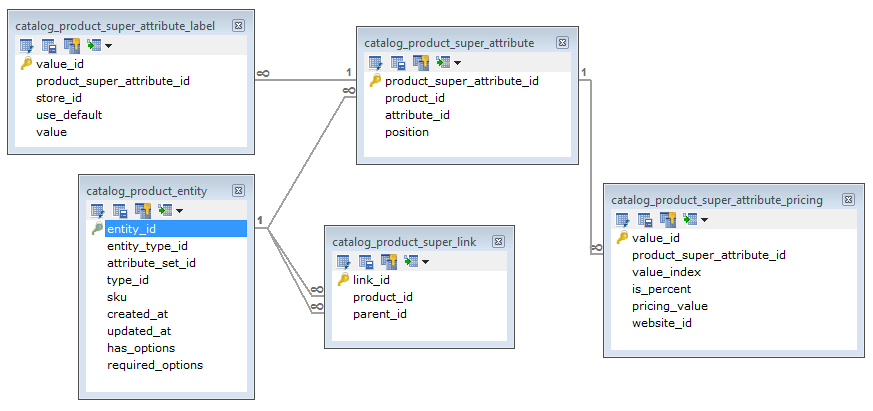
Hope this article gave at least some info about Super Attributes.
Thanks for reading!
Cheers!!
Thanks for this post, it came at just the right time. I have one question, though. How do I get a complete matrix of all product data for all product variants of a configurable product? We have a master configurable product called “Plastic Tablecloths.” Then we have 104 simple products attached to it. I’ve been breaking my back trying to formulate an SQL query that returns all of the product data (weight, size, color, price, etc.) for all of the child products of the master configurable product. Instead of getting back 104 rows I get back over 5,000 rows. The query seems to be pivoting on the eav_attribute_option table and returning ALL possible options that exist in the attribute set we’re using. Thus I’m getting back rows of products that don’t even exist. I thought it would be possible with just one query, but maybe not. Any ideas? There MUST be a way to get a complete matrix, just like you see when you go into the Magento admin section, select a configurable product, and select the “Associated Products” tab on the left: it shows you all of the products and all of the attributes of said products. If Magento can do it, then it means it’s possible, but I just can’t figure out the right query to do it.
Hello Raj,
Is this possible to import super attribute prices in mass upload.
Please let me know how we can do this.
Hi!
I was looking for bulk superattribute price import as well and this works for me good – https://www.mag-manager.com/useful-articles/how-to/how-to-import-magento-super-attribute-price/
This is immensely helpful.
Do you have a diagram that also has the regular attribute tables for the super attributes?
I think the four join lines between the three tables could be improved.
For catalog_product_super_attribute.product_id ,
I believe it can only be configurable products (or at least not simples), which makes sense because super attributes only act on configurable products.
And that column corresponds to catalog_product_super_link.parent_id.
Now,
catalog_product_super_link.product_id
is the simple product id.
Both configurables and simples are in catalog_product_entity.
But the key point that isn’t as clear in the diagram is everything else mentioned above.