
Greetings Mage Lovers!
In this article, I will be explaining how to merge the customer registration form with the default login form of Magento.
Let’s take a look at the following snapshots. You will know what I am talking about:
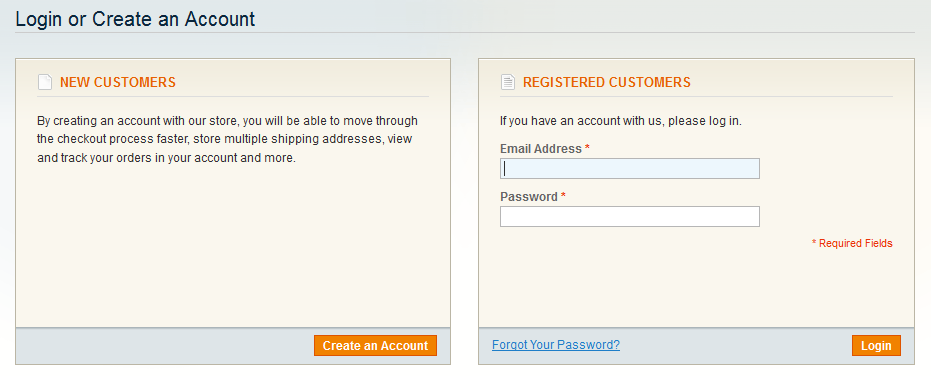
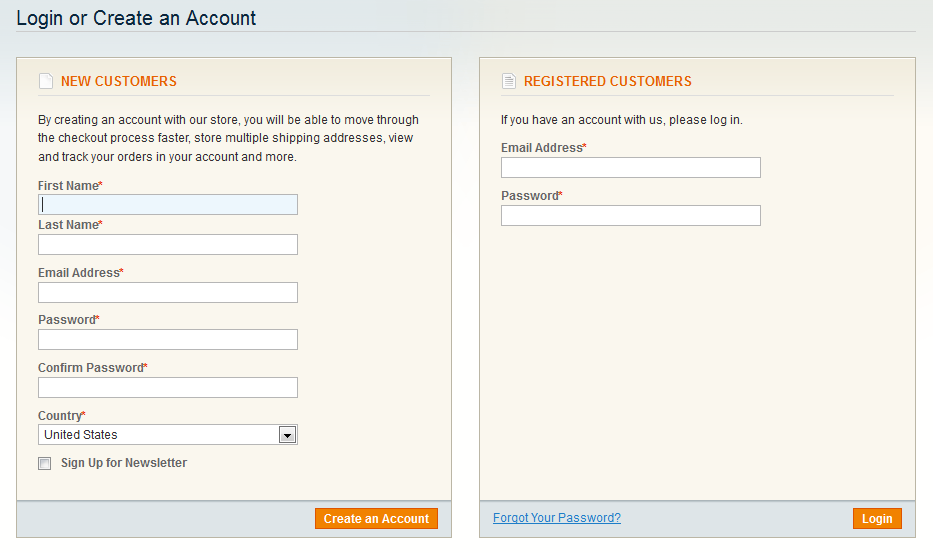
Making a long story short, we just need to implement the following few steps in order to get it done:
1. Creating mini.register.phtml file:
First you need to create a new template file: app/design/frontend/[your-interface]/[your-theme]/template/customer/form/mini.register.phtml
And copy the contents of default register file: app/design/frontend/base/default/template/customer/form/register.phtml to the mini.register.phtml and customize as per your requirement.
If you want like the one depicted in above snapshot then you can simply download the customized mini.register.phtml file from [here]
2. Including mini.register.phtml in login.phtml
First copy the file: app/design/frontend/base/default/template/customer/form/login.phtml to your current theme as:
app/design/frontend/[your-interface]/[your-theme]/template/customer/form/login.phtml
And now you need to modify the new login.phtml so that you can include the contents of mini.register.phtml.
For this, you have to use the following XML code in your layout XML file (preferably in app/design/frontend/[your-interface]/[your-theme]/layout/local.xml) as:
<customer_account_login translate="label">
	<reference name="content">
		<action method="unsetChild"><child>customer_form_login</child></action>
		<block type="customer/form_login" name="customer_form_login2" template="customer/form/login.phtml" >
			<block type="customer/form_register" name="customer_form_register2" template="customer/form/mini.register.phtml">
				<block type="page/html_wrapper" name="customer.form.register.fields.before" as="form_fields_before" />
			</block>
		</block>
	</reference>
	<reference name="head">
		<action method="setTitle" translate="title" module="customer"><title>Login or Create an Account</title></action>
	</reference>
</customer_account_login>
Now you can simply include the mini.register.phtml in your new login.phtml file as:
<?php echo $this->getChildHtml('customer_form_register2'); ?>OR
You can simply download the modified login.phtml file from [here] and place in your template folder as: app/design/frontend/[your-interface]/[your-theme]/template/customer/form/login.phtml
Notes:
Unset of child block: ‘customer_form_login’ and using different name: ‘customer_form_register2’ for the corresponding block is important else you will get double login block.
3. That’s all.
Now clear the cache and reload the customer login page:
- http://your-mage-store/customer/account/login
You will, of course, see some good results.
Hope you found this article interesting.
Cheers!