
As you know Magento 2 GA is already released on mid of November 2015. Now the development of Magento 2 components is taking by storm and the developers are especially busy with porting their popular Magento 1 extensions.
In our case, We are already into Magento 2 development: busy porting some of our popular Magento 1 Extensions and side by side learning new concepts introduced by Magento 2.
In this tutorial, we will learn how to create a custom shipping module in Magento2 which is fairly easy as compared to CRUD & Payment modules.
Assumptions:
- Namespace: MagePsycho
- Module: Customshipping
Custom Shipping Module Development
1. Register the module
File: app/code/MagePsycho/Customshipping/etc/module.xml
<?xml version="1.0"?>
<!--
/**
 * @category   MagePsycho
 * @package    MagePsycho_Customshipping
 * @author     [email protected]
 * @website    https://www.magepsycho.com
 * @license    http://opensource.org/licenses/osl-3.0.php  Open Software License (OSL 3.0)
 */
-->
<config xmlns:xsi="http://www.w3.org/2001/XMLSchema-instance" xsi:noNamespaceSchemaLocation="../../../../../lib/internal/Magento/Framework/Module/etc/module.xsd">
    <module name="MagePsycho_Customshipping" setup_version="1.0.0">
    </module>
</config>
2. Add System Configuration Settings
File: app/code/MagePsycho/Customshipping/etc/adminhtml/system.xml
<?xml version="1.0"?>
<!--
/**
 * @category   MagePsycho
 * @package    MagePsycho_Customshipping
 * @author     [email protected]
 * @website    https://www.magepsycho.com
 * @license    http://opensource.org/licenses/osl-3.0.php  Open Software License (OSL 3.0)
 */
-->
<config xmlns:xsi="http://www.w3.org/2001/XMLSchema-instance" xsi:noNamespaceSchemaLocation="../../../../Magento/Config/etc/system_file.xsd">
    <system>
        <section id="carriers" translate="label" type="text" sortOrder="1" showInDefault="1" showInWebsite="1" showInStore="1">
            <group id="magepsycho_customshipping" translate="label" type="text" sortOrder="2" showInDefault="1" showInWebsite="1" showInStore="1">
                <label>Custom Shipping</label>
                <field id="active" translate="label" type="select" sortOrder="1" showInDefault="1" showInWebsite="1" showInStore="0">
                    <label>Enabled</label>
                    <source_model>Magento\Config\Model\Config\Source\Yesno</source_model>
                </field>
                <field id="title" translate="label" type="text" sortOrder="2" showInDefault="1" showInWebsite="1" showInStore="1">
                    <label>Title</label>
                </field>
                <field id="name" translate="label" type="text" sortOrder="3" showInDefault="1" showInWebsite="1" showInStore="1">
                    <label>Method Name</label>
                </field>
                <field id="price" translate="label" type="text" sortOrder="4" showInDefault="1" showInWebsite="1" showInStore="0">
                    <label>Shipping Cost</label>
                    <validate>validate-number validate-zero-or-greater</validate>
                </field>
                <field id="specificerrmsg" translate="label" type="textarea" sortOrder="80" showInDefault="1" showInWebsite="1" showInStore="1">
                    <label>Displayed Error Message</label>
                </field>
                <field id="sallowspecific" translate="label" type="select" sortOrder="90" showInDefault="1" showInWebsite="1" showInStore="0">
                    <label>Ship to Applicable Countries</label>
                    <frontend_class>shipping-applicable-country</frontend_class>
                    <source_model>Magento\Shipping\Model\Config\Source\Allspecificcountries</source_model>
                </field>
                <field id="specificcountry" translate="label" type="multiselect" sortOrder="91" showInDefault="1" showInWebsite="1" showInStore="0">
                    <label>Ship to Specific Countries</label>
                    <source_model>Magento\Directory\Model\Config\Source\Country</source_model>
                    <can_be_empty>1</can_be_empty>
                </field>
                <field id="showmethod" translate="label" type="select" sortOrder="92" showInDefault="1" showInWebsite="1" showInStore="0">
                    <label>Show Method if Not Applicable</label>
                    <source_model>Magento\Config\Model\Config\Source\Yesno</source_model>
                </field>
                <field id="sort_order" translate="label" type="text" sortOrder="100" showInDefault="1" showInWebsite="1" showInStore="0">
                    <label>Sort Order</label>
                </field>
            </group>
        </section>
    </system>
</config>
3. Define shipping carrier model
File: app/code/MagePsycho/Customshipping/etc/config.xml
<?xml version="1.0"?>
<!--
/**
 * @category   MagePsycho
 * @package    MagePsycho_Customshipping
 * @author     [email protected]
 * @website    https://www.magepsycho.com
 * @license    http://opensource.org/licenses/osl-3.0.php  Open Software License (OSL 3.0)
 */
-->
<config xmlns:xsi="http://www.w3.org/2001/XMLSchema-instance" xsi:noNamespaceSchemaLocation="../../../Magento/Store/etc/config.xsd">
    <default>
        <carriers>
            <magepsycho_customshipping>
                <active>0</active>
                <sallowspecific>0</sallowspecific>
                <price>0</price>
                <model>MagePsycho\Customshipping\Model\Carrier\Customshipping</model>
                <name>Fixed</name>
                <title>Custom Shipping</title>
                <specificerrmsg>This shipping method is not available. To use this shipping method, please contact us.</specificerrmsg>
            </magepsycho_customshipping>
        </carriers>
    </default>
</config>
Notes: ‘config/default/carriers/model’ node is used to define a Model class for Custom Shipping which will be responsible for handling the Shipping Charges.
In fact, this file is also used to set default values for Shipping Settings.
4. Create shipping carrier model class
File: app/code/MagePsycho/Customshipping/Model/Carrier/Customshipping.php
<?php

namespace MagePsycho\Customshipping\Model\Carrier;

use Magento\Quote\Model\Quote\Address\RateRequest;

/**
 * @category   MagePsycho
 * @package    MagePsycho_Customshipping
 * @author     [email protected]
 * @website    https://www.magepsycho.com
 * @license    http://opensource.org/licenses/osl-3.0.php  Open Software License (OSL 3.0)
 */
class Customshipping extends \Magento\Shipping\Model\Carrier\AbstractCarrier implements
	\Magento\Shipping\Model\Carrier\CarrierInterface
{
	/**
	 * @var string
	 */
	protected $_code = 'magepsycho_customshipping';

	/**
	 * @var bool
	 */
	protected $_isFixed = true;

	/**
	 * @var \Magento\Shipping\Model\Rate\ResultFactory
	 */
	protected $_rateResultFactory;

	/**
	 * @var \Magento\Quote\Model\Quote\Address\RateResult\MethodFactory
	 */
	protected $_rateMethodFactory;

	/**
	 * @param \Magento\Framework\App\Config\ScopeConfigInterface $scopeConfig
	 * @param \Magento\Quote\Model\Quote\Address\RateResult\ErrorFactory $rateErrorFactory
	 * @param \Psr\Log\LoggerInterface $logger
	 * @param \Magento\Shipping\Model\Rate\ResultFactory $rateResultFactory
	 * @param \Magento\Quote\Model\Quote\Address\RateResult\MethodFactory $rateMethodFactory
	 * @param array $data
	 */
	public function __construct(
		\Magento\Framework\App\Config\ScopeConfigInterface $scopeConfig,
		\Magento\Quote\Model\Quote\Address\RateResult\ErrorFactory $rateErrorFactory,
		\Psr\Log\LoggerInterface $logger,
		\Magento\Shipping\Model\Rate\ResultFactory $rateResultFactory,
		\Magento\Quote\Model\Quote\Address\RateResult\MethodFactory $rateMethodFactory,
		array $data = []
	) {
		$this->_rateResultFactory = $rateResultFactory;
		$this->_rateMethodFactory = $rateMethodFactory;
		parent::__construct($scopeConfig, $rateErrorFactory, $logger, $data);
	}

	/**
	 * @param RateRequest $request
	 * @return \Magento\Shipping\Model\Rate\Result
	 * @SuppressWarnings(PHPMD.UnusedLocalVariable)
	 */
	public function collectRates(RateRequest $request)
	{
		if (!$this->getConfigFlag('active')) {
			return false;
		}

		/** @var \Magento\Shipping\Model\Rate\Result $result */
		$result = $this->_rateResultFactory->create();

		$shippingPrice = $this->getConfigData('price');

		$method = $this->_rateMethodFactory->create();

		$method->setCarrier($this->_code);
		$method->setCarrierTitle($this->getConfigData('title'));

		$method->setMethod($this->_code);
		$method->setMethodTitle($this->getConfigData('name'));

		$method->setPrice($shippingPrice);
		$method->setCost($shippingPrice);

		$result->append($method);

		return $result;
	}

	/**
	 * Get allowed shipping methods
	 *
	 * @return array
	 */
	public function getAllowedMethods()
	{
		return [$this->_code => $this->getConfigData('name')];
	}
}
That’s all from the development point of view.
Now you need to enable the module by running following series of commands(from the root of your Magento 2 installation):
php bin/magento module:enable MagePsycho_Customshipping --clear-static-content
php bin/magento setup:upgrade
Go to the backend: System > Configuration > Sales > Shipping Methods > You will see a new tab named ‘Custom Shipping’. And the settings looks like:

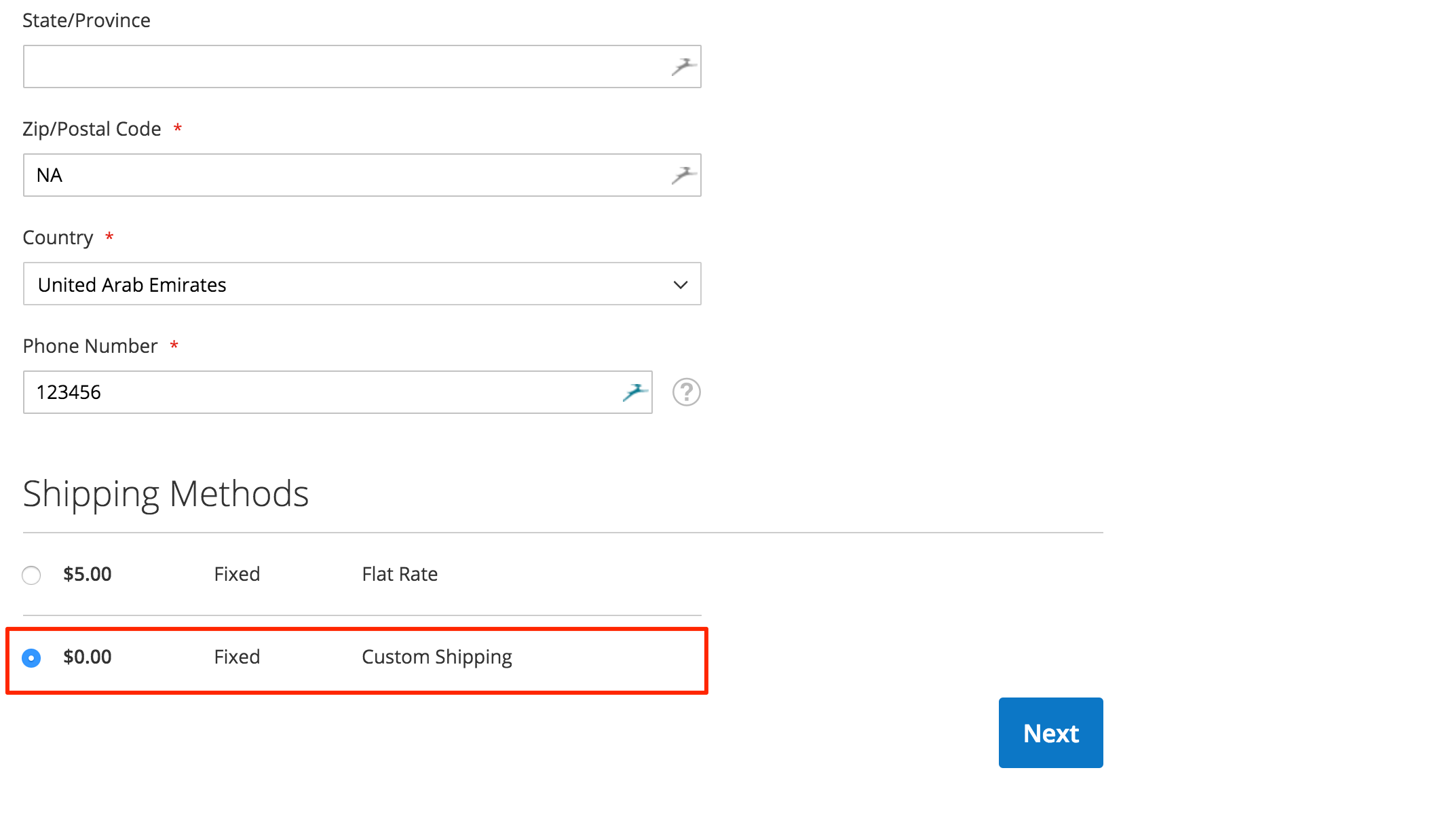
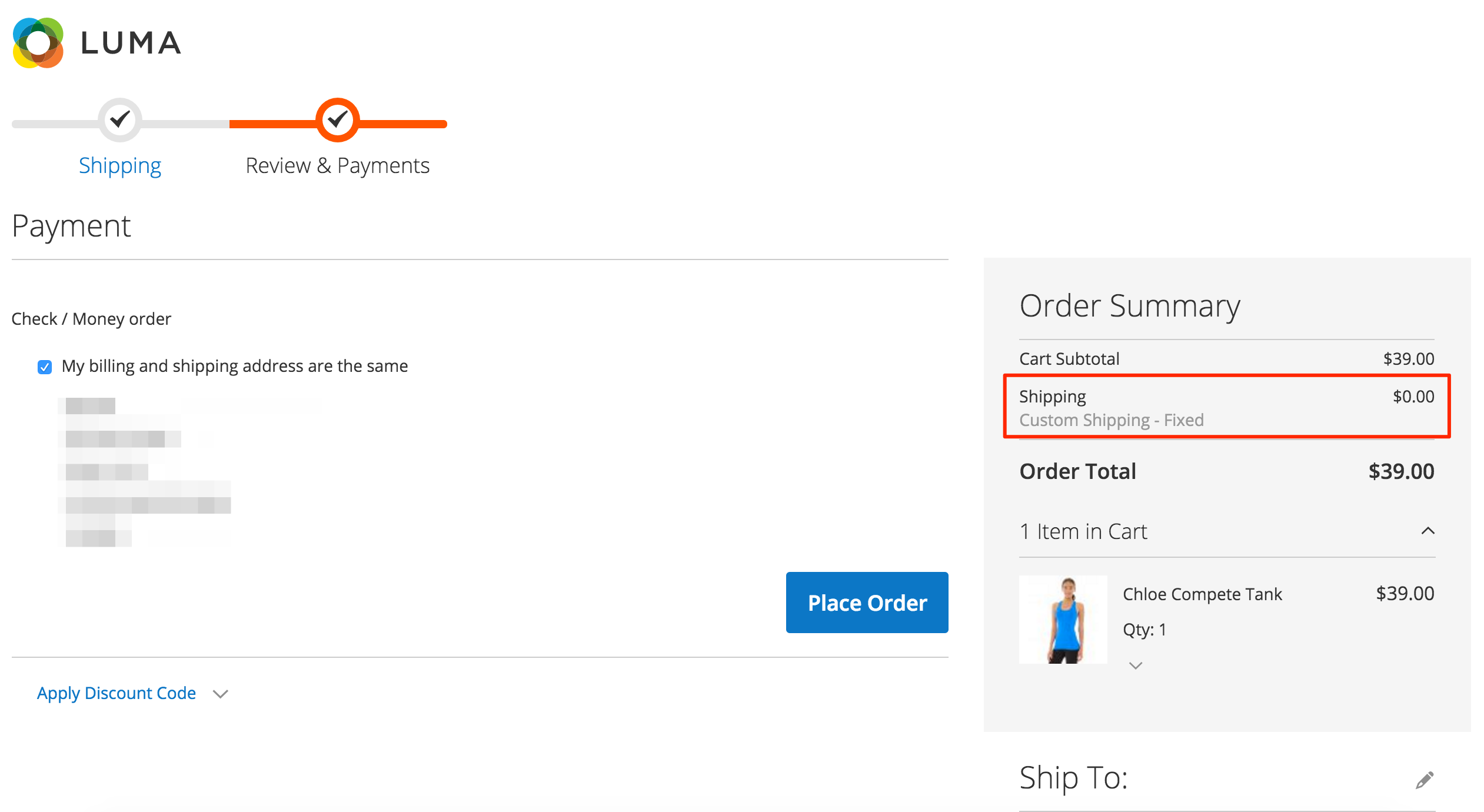
And the frontend looks like:
This module is available on GitHub.
In order to install the module from GitHub:
Installation Using Composer
composer config repositories.magesycho-magento2-custom-shipping git [email protected]:MagePsycho/magento2-custom-shipping.git
composer require magepsycho/magento2-custom-shipping:dev-master
Installation Using Zip
Download the zip file, extract & upload the files to path: app/code/MagePsycho/Customshipping/
After installation, don’t forget to enable the Module as described above.
NOTE: Magento 2 Custom Shipping module is also available in MagePsycho Store
Please do comment below if you have any queries regarding Shipping Module development in Magento 2.