
Introduction:
Have you ever thought of modifying the default multi-select field to checkbox field in an advanced search of Magento?
If not then here we will be discussing how to do which is damn easy and much user-friendlier.
Steps:
1> Copy the following file to your working theme:
app/design/frontend/[interface]/[theme]/template/catalogsearch/advanced/form.phtml
2> Open the form.phtml (from above) and find the following line just after the case ‘select’: ?>
<div class="input-box">
	<?php echo $this->getAttributeSelectElement($_attribute) ?>
</div>
and replace it by the following code
<?php if(in_array($_attribute->getAttributeCode(), array('manufacturer'))): ?>
<div class="input-box">
	<?php
		 $options = $_attribute->getSource()->getAllOptions(false);
		 foreach($options as $_option):
			 $isChecked = in_array($_option['value'], $this->getRequest()->getParam($_attribute->getAttributeCode())) ? ' checked="checked"' : null;
			 ?>
	<input type="checkbox" name="<?php echo $_attribute->getAttributeCode(); ?>[]" value="<?php echo $_option['value']; ?>"<?php echo $isChecked; ?> /> <?php echo $_option['label']; ?><br />
	<?php
		 endforeach;
	?>
</div>
<?php else: ?>
<div class="input-box">
	<?php echo $this->getAttributeSelectElement($_attribute); ?>
</div>
<?php endif; ?>
Note: Here we have customized the display for manufacturer attribute, similarly you can customize for other attributes. Just you need to add the attribute code(for example color) in the array as:
<?php if(in_array($_attribute->getAttributeCode(), array('manufacturer', 'color'))): ?>3> Try to refresh the advanced search page: http://your-magento-url/catalogsearch/advanced
You will see some good results 🙂

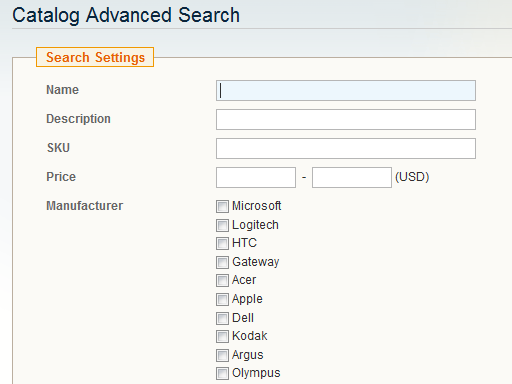
Note: You can use some CSS in order to break the checkboxes in multi-columns for better display.
Hope you liked this article 🙂