

Mass Importer Pro: Price Importer is the fastest price import tool available for Magento CE/EE.
Recently MagePsycho team released the most awaited features in Mass Importer Pro: Price Importer Ver 1.1.0
ChangeLog (0.1.5 – 1.1.0)
- Compatible with Magento CE 1.3.x – 1.9.x & EE 1.12.x – 1.14.x
- Added cron job-based price importing with the logging feature
- Added shell/command line based price importing with the logging feature
- Added price rounding feature (normal rounding, rounding to nearest)
- Added relative(fixed & percentage) pricing for special, tier & group prices.
- Changed store view based pricing import to a website based(as prices have either global or website level scope)
- Added store wise price export
- Added option for deleting special_price, special_from_date, special_to_date by marking the value with ‘x’ or ‘X’
- Added button for checking CSV file format (beside of Price Import button)
- Added Changelog file: Changelog.txt
- Added Uninstallation file: Uninstall.txt
- Refactored the code
New Features
1. Cron Job based price importing
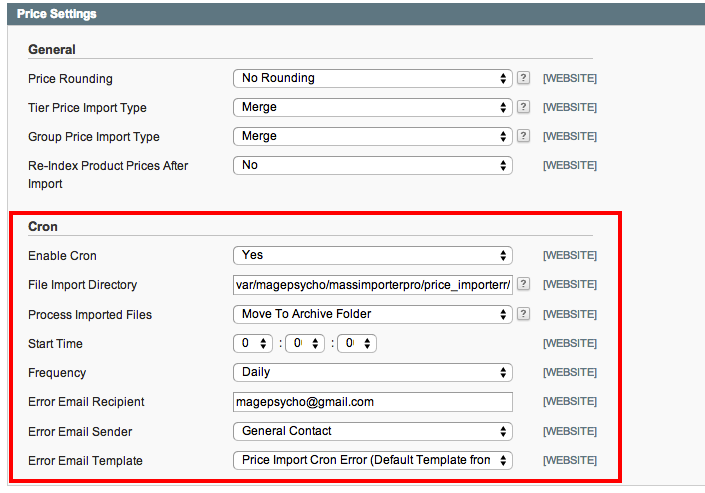
To configure this, go to Mass Importer Pro > Manage Settings > Price Settings
You will see the following setting:
| Field | Description |
|---|---|
| Enable Cron | Yes |
| File Import Directory | The path from where CSV files will be imported via cron. Default: var/magepsycho/massimporterpro/price_importerr/cron |
| Process Imported Files | What to do after the files are imported? Available options are: No Action Move To Archive Folder Delete |
| Start Time | At what time cron will run. If ‘Start Time’ = 00 00 00 and ‘Frequency’ = Daily then equivalent cron expression will be 0 0 * * * (which means cron will be run once a day at midnight) REF: http://en.wikipedia.org/wiki/Cron |
| Frequency | The frequency at which cron will run. Options: Daily Weekly Monthly |
| Error Email Recipient | Error email will be sent to this address in case of failure |
| Error Email Sender | Error Email Sender |
| Error Email Template | Email Template |
Notes:
Make sure that cron is enabled for your Magento store.
Refer to the following article for more info:
http://www.magentocommerce.com/wiki/1_-_installation_and_configuration/how_to_setup_a_cron_job
2. Shell/Command line based price importing
There are no backend settings for Shell based price importing.
You just have to open the terminal and run the following commands.
1. Go to Magento root directory:
cd /path/to/your/magento/root2. Price Importer help command:
php -f shell/priceimporter.php --help3. Run price import (without reindexing)
php -f shell/priceimporter.php -- -import "path/to/csv/file.csv"4. Run price import (with reindexing)
php -f shell/priceimporter.php -- -import "path/to/csv/file.csv" -reindex

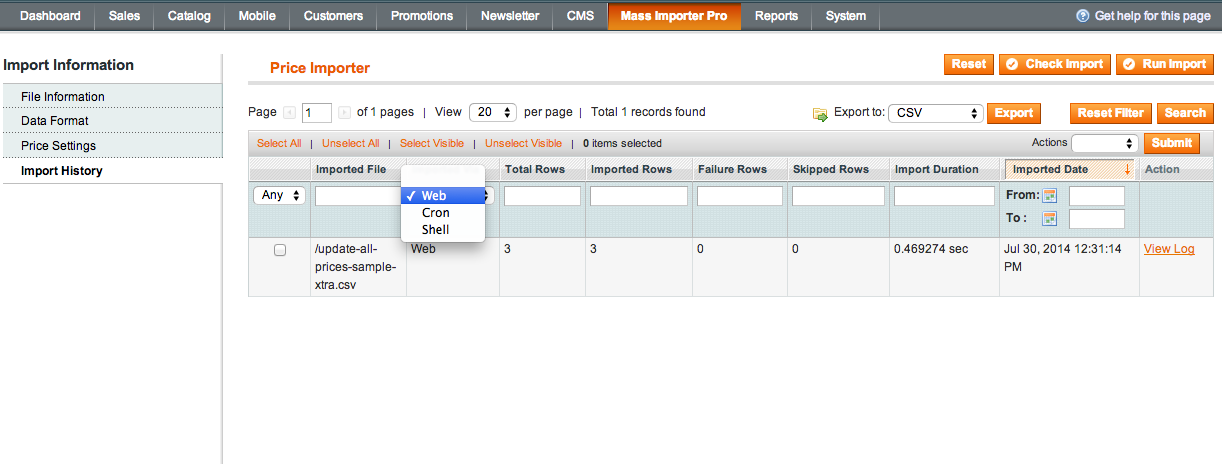
So far in Mass Importer Pro, Prices can be imported via Web Forms, Cron Jobs & Command Line. From wherever you run the import, You can view the import history from the menu ‘Mass Importer Pro’ > ‘Price Importer’ > ‘Import History’ Tab > Filter the results by ‘Imported Via’.
3. Price rounding feature
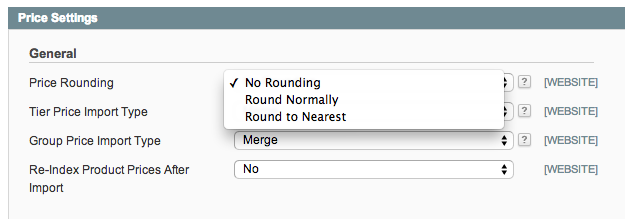
There are three types of options for price rounding:
| Rounding Type | Description |
|---|---|
| No Rounding | No action with the price |
| Round Normally | Uses PHP’s round() function. Examples: 9.43 -> 9.00 9.63 -> 10.00 |
| Round to Nearest | You have to set Rounding value for this. Examples: 9.43 -> 9.00 + (If Rounding Value = 0.99) = 9.99 9.43 -> 9.00 + (If Rounding Value = 0.50) = 9.50 This option is useful if you want to update your prices ending with .99, .50, etc. |
4. Relative(fixed & percentage) based price importing
You can self increment or decrement the prices by fixed value or percentage. Also you can set ‘special_price’, ‘tier_price’ & ‘group_price’ to be certain percentage of ‘price’.
Valid Examples:
| Value | Description |
|---|---|
| 10 | Fixed Value |
| +10 | Increment current value by 10 |
| -10 | Decrement current value by 10 |
| 10% | 10% of the base price (note that there is no sign in front) Note: This applies only for price types: special_price, tier_price & group_price |
| +10% | Increment current price by 10% |
| -10% | Decrement current price by 10% |
5. Option to validate your CSV data
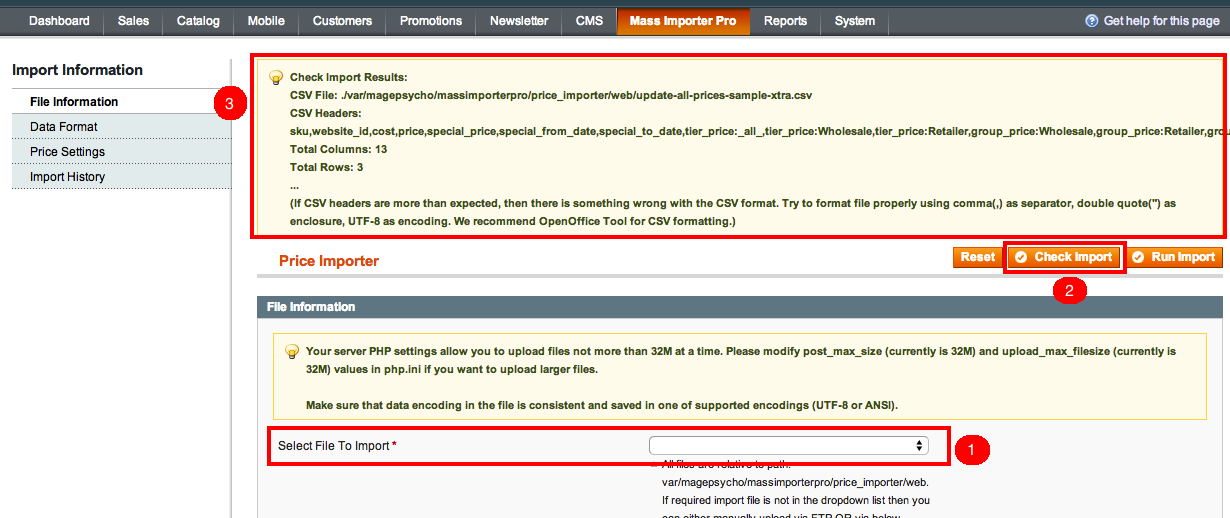
You can validate the CSV data before importing any prices.
Go to menu ‘Mass Importer Pro’ > ‘Price Importer’ > Select the import file > Click on the ‘Check Import’ button which will give you the check results.
6. Website wise price Import
Before Ver 1.1.0 You had to use a combination of SKU + store_id as a unique identifier to update prices. Since Magento has either global or website level scope for prices, we have replaced ‘store_id’ by ‘website_id’.
In order to find the website_id, go to System > Manage Stores > Click on the related Website > Note the website_id from URL.
By default website_id = 0 (global)
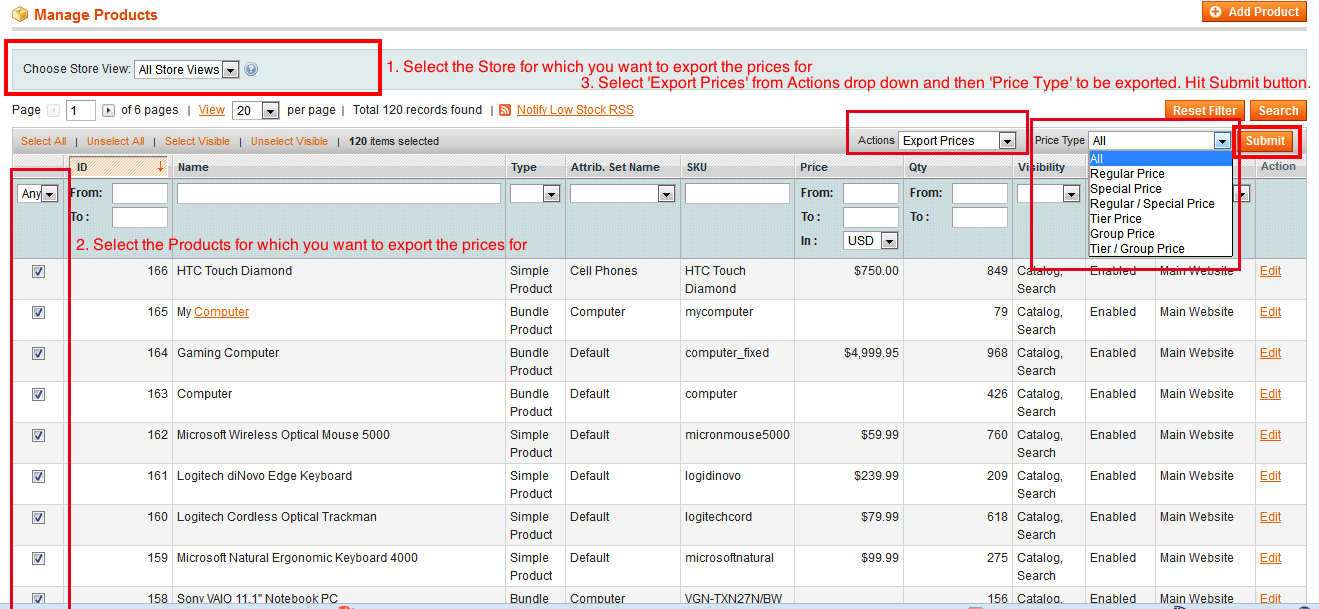
7. Website wise price Export
You can export prices in a format compatible with Mass Importer Pro from menu ‘Catalog’ > ‘Manage Products’.
How to export prices is clear from the below screenshot:
Also see: Importing regular, special, tier & group prices using ‘Mass Importer Pro: Price Importer’ Extension
Those were the major updates on the newer version. Besides we have fixed some bugs & improved the functionality.
If you have any queries/issues regarding the extension, please do not hesitate to Contact Us.