
Introduction
As you know in Magento, the catalog has a dynamic menu but cms don’t in frontend.
If you are curious about how to create a dynamic menu for CMS which can either be included in the left or right sidebar for all CMS pages, then you are in right place.
Steps
1. Create navigation.phtml file
Create nagivation.phtml file in folder:
app/design/frontend/[your-interface]/[your-theme]/template/cms/
and add the following code:
<?php
$cmsPages = Mage::getModel('cms/page')->getCollection()
->addStoreFilter(Mage::app()->getStore()->getId())
->addFieldToFilter('is_active',1)
->addFieldToFilter('identifier', array(
array(
'nin' => array(
'home',
'no-route',
'enable-cookies',
'empty'
)
)
)
);
?>
<script type="text/javascript" src="http://ajax.googleapis.com/ajax/libs/jquery/1/jquery.min.js"></script>
<style type="text/css">
#cms-navigation a.active { color: red; }
</style>
<script type="text/javascript">
jQuery.noConflict();
jQuery(document).ready(function() {
var url = window.location.pathname,
urlRegExp = new RegExp(url.replace(/\/$/,'') + "$");
jQuery('#cms-navigation a').each(function(){
if(urlRegExp.test(this.href.replace(/\/$/,''))){
jQuery(this).addClass('active');
}
});
});
</script>
<div class="block">
<div class="block-title">
<strong><span>CMS Navigation</span></strong>
</div>
<div class="block-content">
<ul id="cms-navigation" style="padding: 10px;">
<?php
foreach($cmsPages as $_cms):
$page = $_cms->getData();
?>
<li><a href="<?php echo $this->getBaseUrl() . $page['identifier']; ?>"><?php echo $page['title']; ?></a></li>
<?php
endforeach;
?>
</ul>
</div>
</div>OR
You can simply download the navigation.phtml file from [here]
2> Include CMS Navigation in Layout
Copy/paste the following XML code in your layout XML file (preferably in your theme’s local.xml file):
<cms_page_view>
	<reference name="left"><!--or right-->
		<block type="core/template" name="cms-navigation" template="cms/navigation.phtml" before="-" />
	</reference>
</cms_page_view>
This will automatically include the CMS navigation in the layout file.
Notes:
Make sure you select the proper Layout template from CMS form (Design > Page Layout > Layout).
For example, in order to include CMS navigation in the left column, you either have to use: Layout = 2 columns with left bar or 3columns.
3> That’s all.
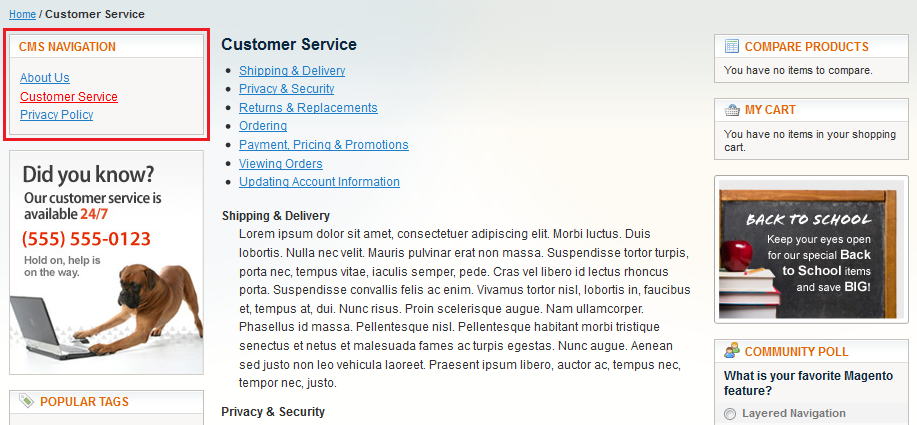
If you visit the CMS pages in the frontend you will see the navigation with all the CMS pages dynamically included with the current one being highlighted (see below snapshot).
This will, of course, make your CMS pages look more beautiful and user-friendlier.
Happy E-commerce!