
Skip to content
MagePsycho Blog
MagePsycho Blog
  • Magento 2 Extensions
    • Customer Experience
      • M2 Customer Group Selector Pro
      • M2 Customer Redirect Pro
      • M2 Store Restriction Pro
    • Checkout / Sales Motivation
      • M2 Region & City Manager
      • M2 Sales Promotion Pro (FREE Gift)
    • Payment Gateways
      • M2 E-Path Payment
    • Import / Export
      • M2 Mass Importer Pro (Price)
  • Free Extensions
    • Developer Tools
      • M2 Easy Template Path Hints
      • M2 Preview/Visit Catalog
    • Sales / Admin
      • M2 Disable Customer Registration
      • M2 Custom Shipping
    • Catalog / Pricing
      • M2 Product Attachment
      • M2 Product Discount Label
      • M2 Store View Pricing
      • M2 Cart Discount Limiter
    • SEO / Marketing
      • M2 SEO Suite
  • Services
  • Blog
  • Magento 2 Extensions
    • Customer Experience
      • M2 Customer Group Selector Pro
      • M2 Customer Redirect Pro
      • M2 Store Restriction Pro
    • Checkout / Sales Motivation
      • M2 Region & City Manager
      • M2 Sales Promotion Pro (FREE Gift)
    • Payment Gateways
      • M2 E-Path Payment
    • Import / Export
      • M2 Mass Importer Pro (Price)
  • Free Extensions
    • Developer Tools
      • M2 Easy Template Path Hints
      • M2 Preview/Visit Catalog
    • Sales / Admin
      • M2 Disable Customer Registration
      • M2 Custom Shipping
    • Catalog / Pricing
      • M2 Product Attachment
      • M2 Product Discount Label
      • M2 Store View Pricing
      • M2 Cart Discount Limiter
    • SEO / Marketing
      • M2 SEO Suite
  • Services
  • Blog

Home » Magento » Merging registration form with default login page of Magento (creating the mini-registration form)

Merging registration form with default login page of Magento (creating the mini-registration form)

June 21, 2019September 26, 2012 by Raj KB

Greetings Mage Lovers!

In this article, I will be explaining how to merge the customer registration form with the default login form of Magento.
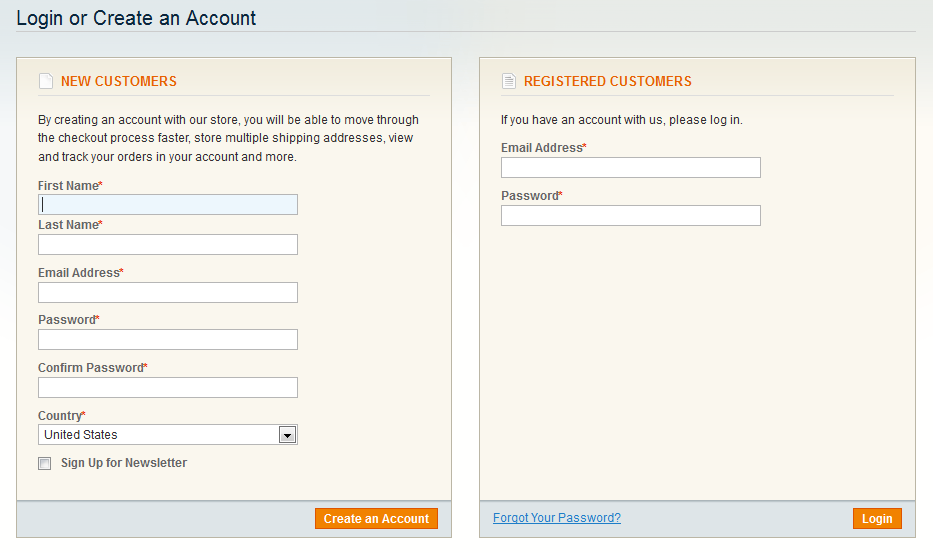
Let’s take a look at the following snapshots. You will know what I am talking about:
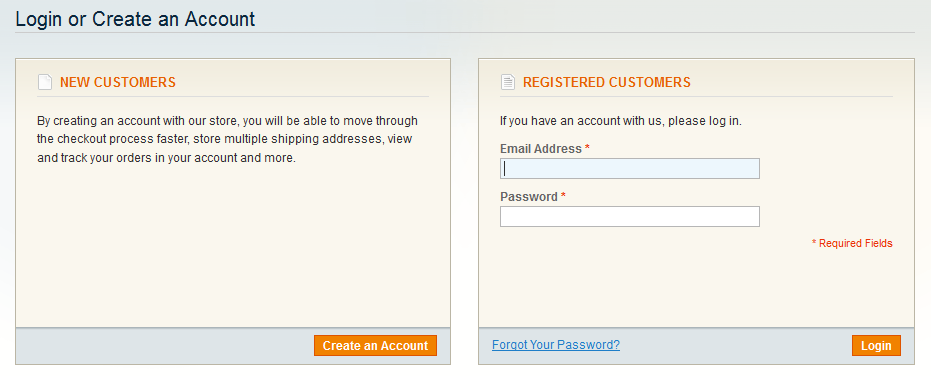
Default Login Page
Merged Register / Login Form

Making a long story short, we just need to implement the following few steps in order to get it done:

1. Creating mini.register.phtml file:

First you need to create a new template file: app/design/frontend/[your-interface]/[your-theme]/template/customer/form/mini.register.phtml
And copy the contents of default register file: app/design/frontend/base/default/template/customer/form/register.phtml to the mini.register.phtml and customize as per your requirement.

If you want like the one depicted in above snapshot then you can simply download the customized mini.register.phtml file from [here]

2. Including mini.register.phtml in login.phtml

First copy the file: app/design/frontend/base/default/template/customer/form/login.phtml to your current theme as:
app/design/frontend/[your-interface]/[your-theme]/template/customer/form/login.phtml
And now you need to modify the new login.phtml so that you can include the contents of mini.register.phtml.
For this, you have to use the following XML code in your layout XML file (preferably in app/design/frontend/[your-interface]/[your-theme]/layout/local.xml) as:

<customer_account_login translate="label">
	<reference name="content">
		<action method="unsetChild"><child>customer_form_login</child></action>
		<block type="customer/form_login" name="customer_form_login2" template="customer/form/login.phtml" >
			<block type="customer/form_register" name="customer_form_register2" template="customer/form/mini.register.phtml">
				<block type="page/html_wrapper" name="customer.form.register.fields.before" as="form_fields_before" />
			</block>
		</block>
	</reference>
	<reference name="head">
		<action method="setTitle" translate="title" module="customer"><title>Login or Create an Account</title></action>
	</reference>
</customer_account_login>

Now you can simply include the mini.register.phtml in your new login.phtml file as:

<?php echo $this->getChildHtml('customer_form_register2'); ?>

OR
You can simply download the modified login.phtml file from [here] and place in your template folder as: app/design/frontend/[your-interface]/[your-theme]/template/customer/form/login.phtml
Notes:
Unset of child block: ‘customer_form_login’ and using different name: ‘customer_form_register2’ for the corresponding block is important else you will get double login block.

3. That’s all.

Now clear the cache and reload the customer login page:

  • http://your-mage-store/customer/account/login

You will, of course, see some good results.

Hope you found this article interesting.
Cheers!

Categories Magento Tags login, mini registration form, register
Bug in Magento 1.4.1.1: Pagination links missing in tagged product list
Custom Login Redirect Pro: How to keep your customer logged in even after redirection to another store?

Search Blog

Categories

  • Apache (4)
  • Javascript (4)
  • jQuery (7)
  • Latest (11)
  • Linux (14)
  • Mac OS-X (3)
  • Magento (74)
  • Magento 2 (16)
  • Mysql (13)
  • Nginx (2)
  • PHP (11)
  • Ruby (1)
  • Updates (4)
  • Web Service (2)

Recent Posts

  • Change Table Prefix for Magento 2 DB (After Installation)
  • Fix Region/State Dropdown not Loading on New Account Creation Page
  • Tinkerwell: Tinker with your local/remote PHP & Magento 2 Code
  • How to Install Multiple Versions of PHP on Ubuntu?
  • Import Product Reviews in Magento via SQL

Archives

Quality Magento Commerce extension & service provider since 2009

Connect with us

Navigation

  • About Us
  • Services
  • Rewards Program
  • Affiliate Program
  • Privacy & Policy
  • Terms & Conditions

Support

  • Contact Us
  • Submit Ticket
  • FAQs

Resources

  • Blog
  • Knowledge Base
  • Documentation
  • Sitemap
  • We Accept
© 2026 MagePsycho Store. All Rights Reserved.